Fast options trading for IBKR day traders
Trade stock, index, and futures options across multiple symbols from one window, with take profit and stop loss running on every position.
The interface
Option chains, open positions, and TP/SL controls in a single window. Stock, index, and futures options in the same view.
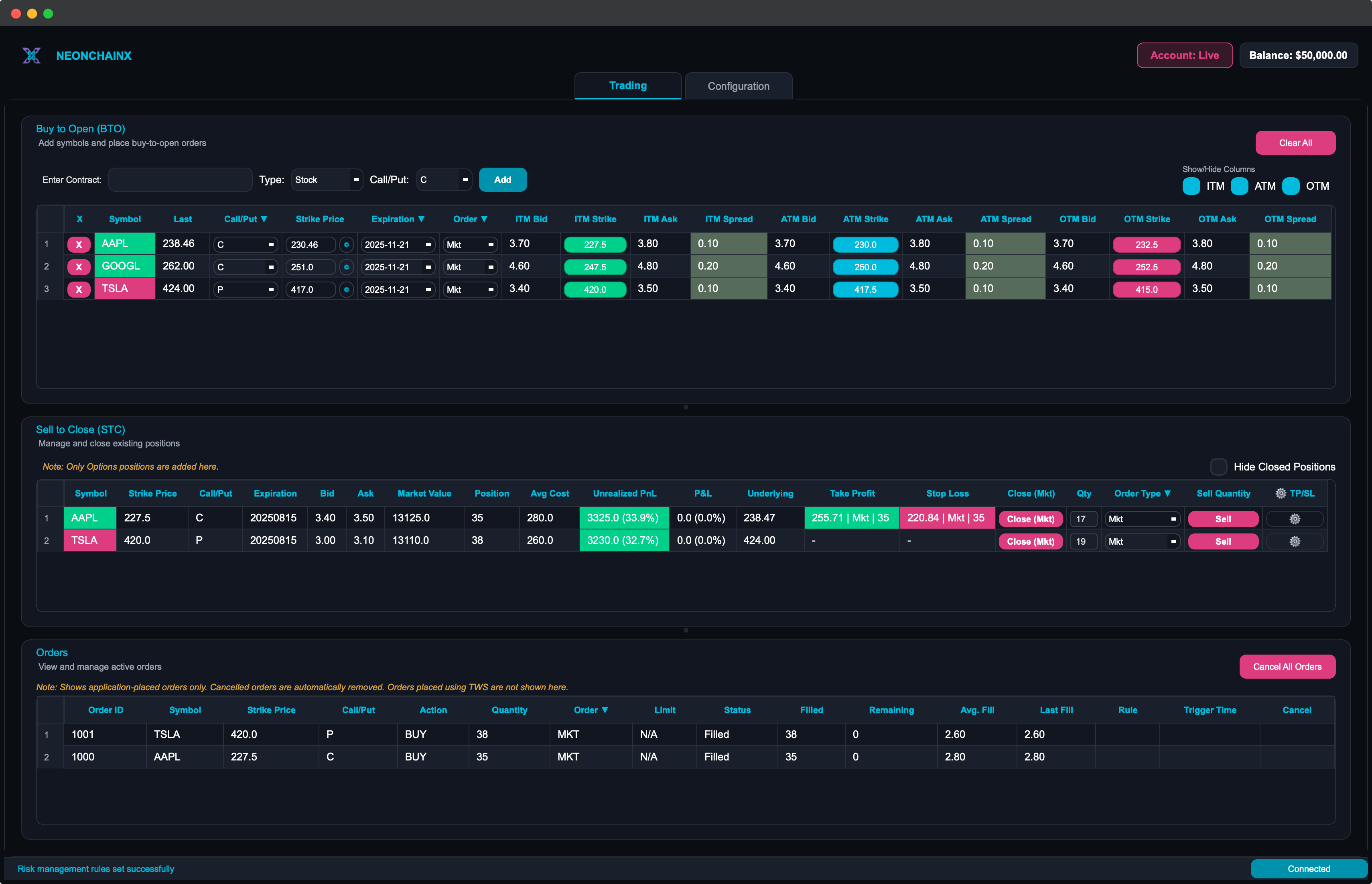
Everything on one screen
Multi-symbol option chains, risk rules, and execution in a single window. No switching tabs to check another underlying.
Multi-Symbol Option Chains
Track several underlyings at once. Each chain shows three strikes around the money with the spread cost in view.
Automated TP/SL
Set take profit and stop loss against the underlying price, the option premium, or both at the same time.
One-Click Orders
Market and mid-point entries, and position closes, without walking through a stack of confirmation dialogs.
Live P&L
Unrealized P&L per position and totals across the account update as the market moves.
Watchlist That Persists
Symbols you were tracking reload on restart, so you pick up the session where you left it.
Trigger Audit Trail
See which orders a TP/SL rule placed and which you placed by hand, with the trigger and execution times.
Why traders switch from traditional platforms
Speed over complexity
General purpose platforms spread an options trade across several screens. NeonChainX shows the parts a day trader acts on: the symbols you are watching, the spread you are paying, and the button that fills the order.
One click, not five
Market orders, mid-point orders, and position closes each go out on a single click. There is no dialog stack between you and a fill you are trying to catch.
The spread is visible
Each chain shows three strikes around the money, and a wide spread is flagged in red before you buy it rather than after you check the fill.
How it works
Start TWS
Log in to TWS or IB Gateway and enable API access on port 7497 for paper or 7496 for live.
Connect NeonChainX
Install the desktop app and point it at that session. Your broker login stays in TWS.
Add symbols and trade
Load the symbols you are watching, set TP/SL rules, and place orders from one window.
Setup guides, including TWS API ports and the macOS install fix, are in Docs.
How your account stays yours
Your broker login stays local
NeonChainX reaches Interactive Brokers through the TWS or IB Gateway session running on your own machine. Your broker credentials are never sent to us.
What we do receive
Your subscription is checked against your account email and license key, and the app sends diagnostic logs so we can look into issues you report. Privacy policy.
A desktop app, not a browser tab
Orders are placed by software running on your machine rather than routed through a web session. Windows, macOS, and Linux builds are available.